

How to re-order features in Offers?
Context
Section titled “Context”By defining a consistent order for features, you provide better readability for potential customers and make their decision-making process easier. A clear and uniform presentation of features not only enhances the user experience but can also increase conversion rates.
The order of features is defined globally, ensuring a standardized presentation across all offers. When a feature is shared by multiple offers, it will always appear on the same line. This consistency helps customers compare plans more easily and improves their user experience by allowing them to quickly identify differences between subscriptions.
How to Change the Order of Features?
Section titled “How to Change the Order of Features?”To modify the order of features in offers, follow these steps:
- Access the Features List
- Go to the Catalogs > Features menu.
- Modify the Display Order
- Click on the “Actions” button at the top of the page.
- Select “Change features order”.
- Rearrange the features in the desired order.
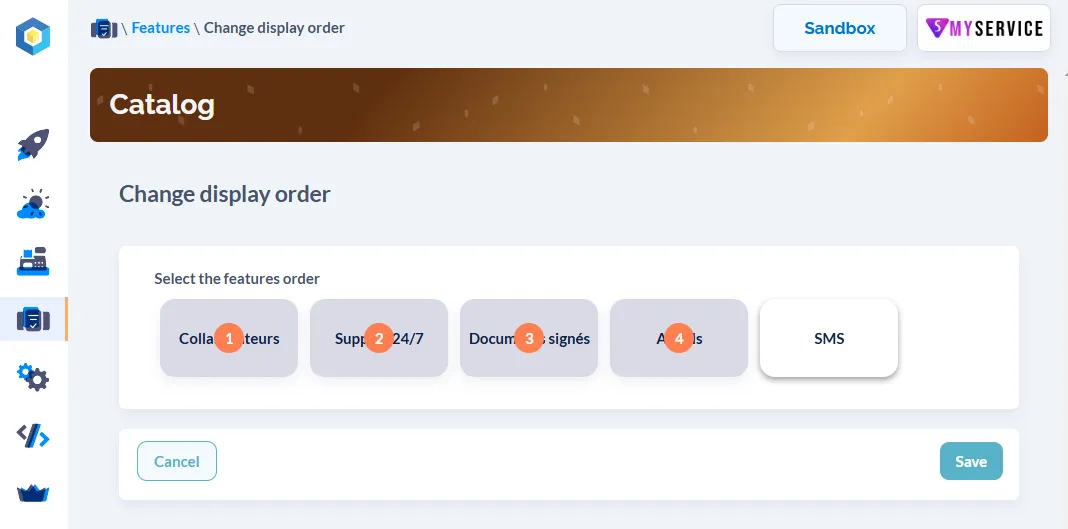
Once these changes are saved, the order of the features will be updated across all offers displayed on the customer portal.
Further Resources
Section titled “Further Resources”You can: