

How to change the action associated with the "choose" button on the pricing table ?
Context
Section titled “Context”ProAbono provides a set of hosted pages that, once integrated, allows your customers to subscribe to your offers.
However, it is possible to modify the sequence of these hosted pages to customize the subscription workflow for your customers according to your business rules and constraints.
Process
Section titled “Process”1/ Go to the “Customer workflow” settings
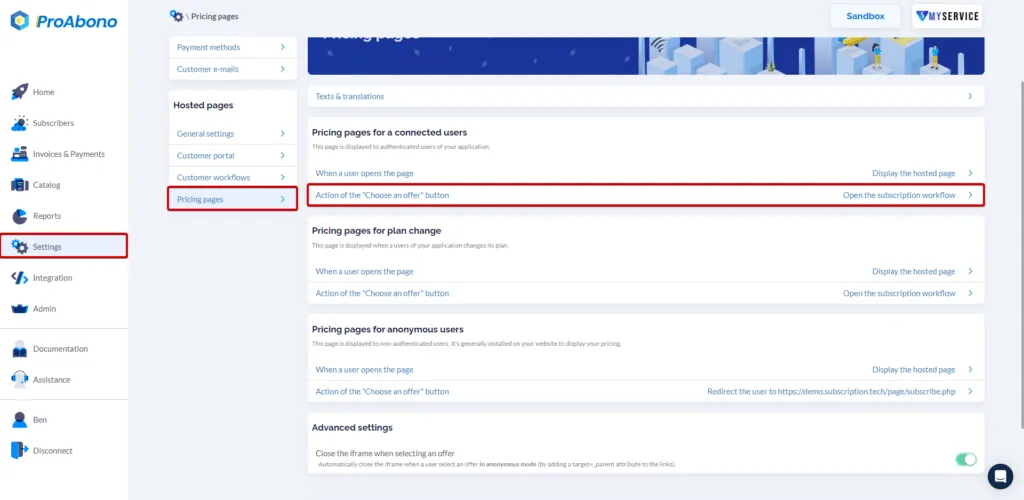
Section titled “1/ Go to the “Customer workflow” settings”- Click on “Settings” from the left menu.
- Then click on the “Offer Pages” button in the hosted pages section.
- Click on the option: “choose on an offer button”.
2/ Enter the redirection URL
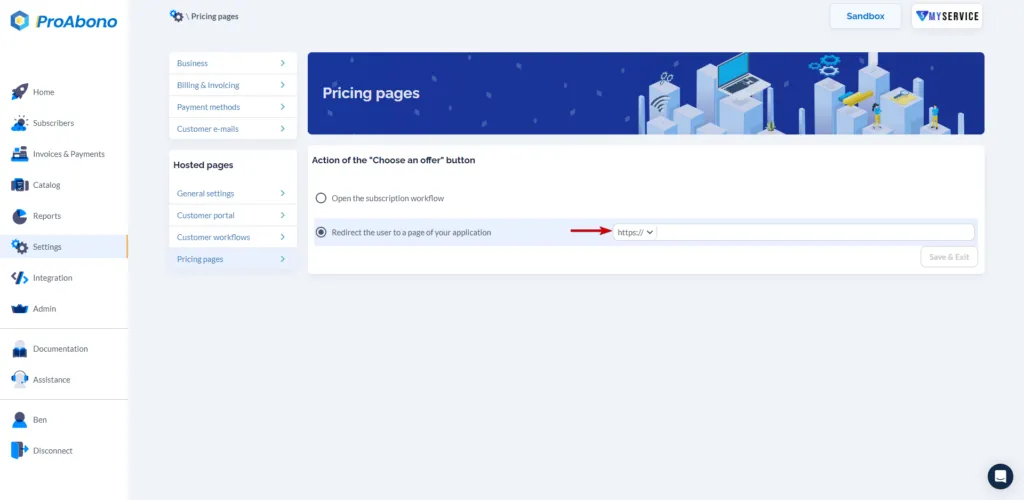
Section titled “2/ Enter the redirection URL”You can then fill in the field with the URL of your application.
3/ Save your changes
Section titled “3/ Save your changes”- Click on the “Save” button to apply your modification.
Once saved, all your customers will be redirected to this URL when they click on the “choose” button from the offers presentation page.