

How to customize the behavior of the subscription workflow?
Context
Section titled “Context”Within the ProAbono subscription workflow, there are global redirections available :
- URL to your registration or account creation form
- URL for logging in to your application
- URL for redirection after subscription
These redirections allow you to create the customer in your application if they don’t exist already, or simply to identify them. You can redirect your customers after they have completed their subscription to your application’s homepage, a specific “My Account” or “My Subscriptions” page, or any URL of your choice.
These redirections are the basic redirections in the subscription workflow.
Process: Customize the redirection before subscription
Section titled “Process: Customize the redirection before subscription”The fields where you can enter the redirection URLs for your registration and login pages are accessible from the general settings.
1/ Go to your Business settings
Section titled “1/ Go to your Business settings”- Click on “Settings” from the left menu.
- Then click on the “General Settings” menu
- Click on “Segment Settings”
- Select the relevant segment.
You will find the following fields:
- Website URL
- Registration Page
- Login Page
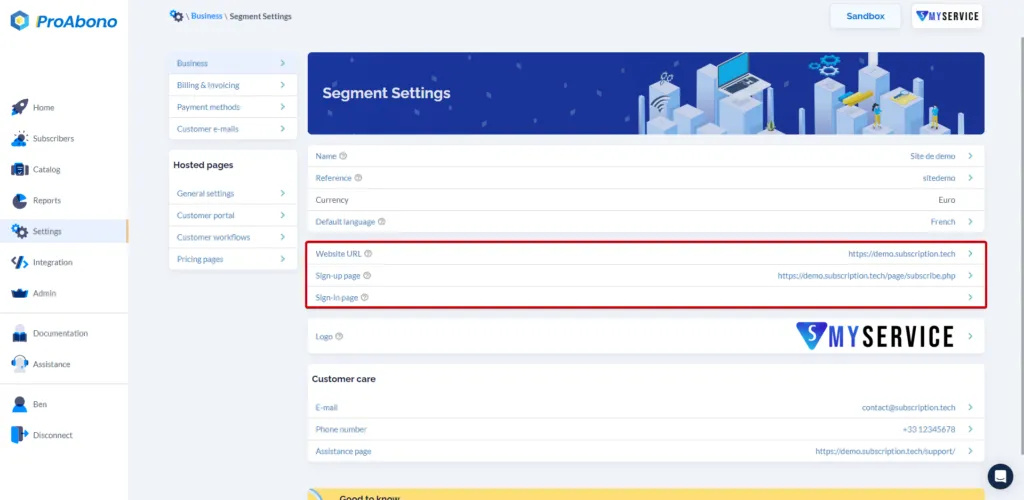 **Note:** The website URL allows you to maintain a link between your application and ProAbono. This field is not a redirection.
Then click on the field you want to modify the URL for.
Process: Customize the redirection after subscription
Section titled “Process: Customize the redirection after subscription”The fields where you can enter the redirection URLs after a successful subscription are accessible from the hosted pages settings.
1/ Go to the hosted pages settings.
Section titled “1/ Go to the hosted pages settings.”- Click on “Settings” from the left menu.
- Then click on the “Customer workflow” menu
- Click on “URL redirection”
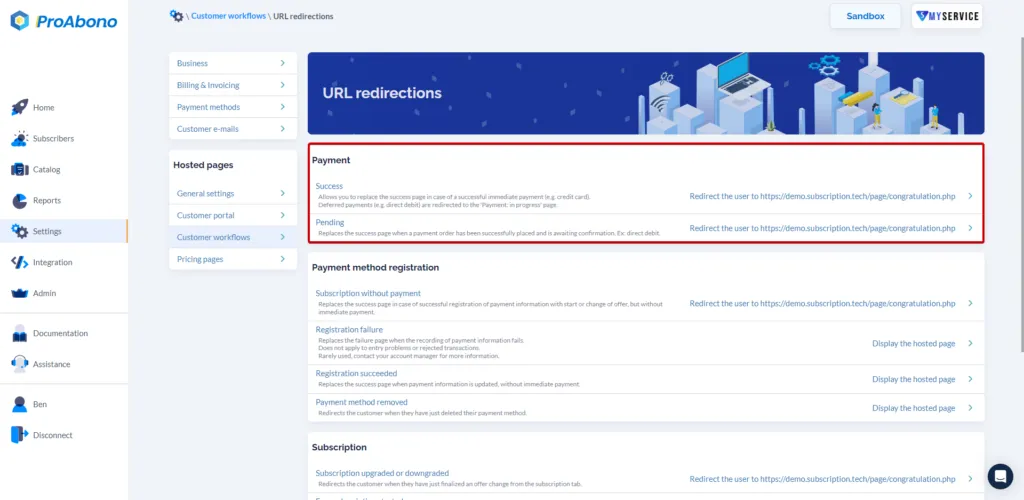
You will find different possible redirections for steps such as:
- Payment
- Payment method registration
- Subscription-related processes