

How to add a new entry in the customer balance ?
Context
Section titled “Context”The customer’s balance is a container that holds all the invoicing lines (subscriptions, one-time charges, etc..)
If you want to add an additional charge, simply create a new line in the balance and describe what you want to add:
- The credit or debit type
- An amount
- An application date (optional)
Procedure
Section titled “Procedure”1/ Access the customer’s balance
Section titled “1/ Access the customer’s balance”- Click on “Subscribers” from the left menu.
- Select the relevant customer.
- Click on the “balance” tab.
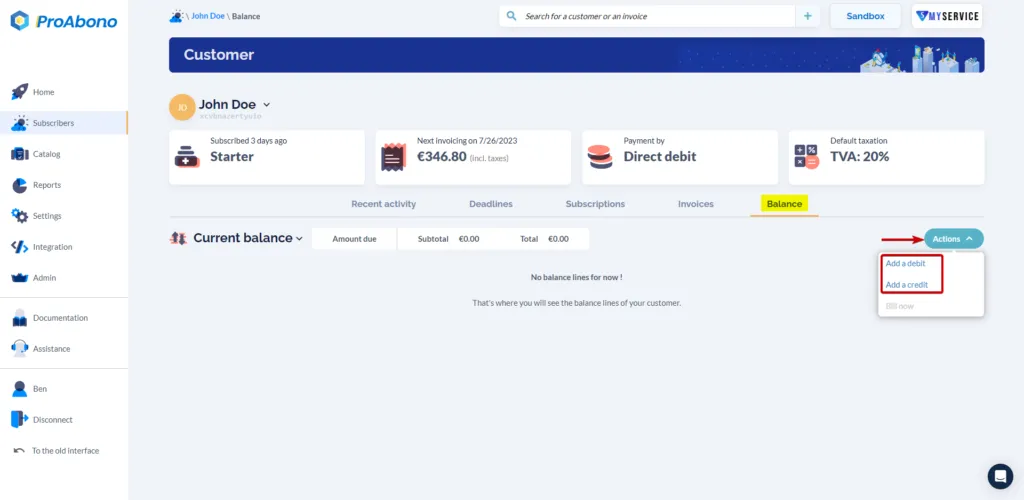
2/ Open the charge addition form
Section titled “2/ Open the charge addition form”- Open the “Actions” menu.
- Click on “Add a debit” or “Add a credit”.
3/ Fill out the form
Section titled “3/ Fill out the form”- The “label” field allows you to associate information about the service or product you want to invoice with the entry.
- The line type helps classify the entry in the balance.
- The date field allows you to specify a processing date.
- If the date is in the past or present, the entry will be automatically added to the next invoice.
- If the date is in the future, the line will be processed for invoicing once the date is reached.
Let’s say today is June 1st.
Your customer is billed on the 5th of each month.
If you set the entry for:
- June 4th, the entry will be on the June 5th invoice,
- June 18th, the entry will be on the July 5th invoice.
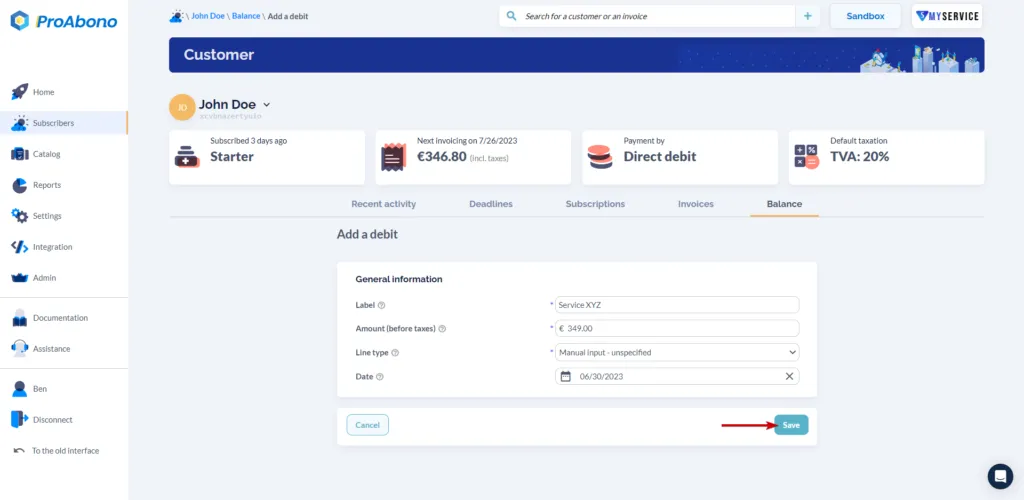
4/ Confirm adding the line to the balance
Section titled “4/ Confirm adding the line to the balance”- Don’t forget to click on the “Save” button at the bottom of the page to finalize your changes.
For more information
Section titled “For more information”Here are other ways to correct an invoice: