

WP Tuto #3 - Customize the registration / login page
Context
Section titled “Context”Now that you have completed all the main configurations to enable the creation of your ProAbono customers and subscription, you can customize the registration/login page to align with the style of your site.
Procedure
Section titled “Procedure”Customize the Registration/Login Page
Section titled “Customize the Registration/Login Page”The “Loginpress” plugin allows you to fully customize the WordPress registration/login page.
Step 1: Install “Loginpress”
To download this extension:
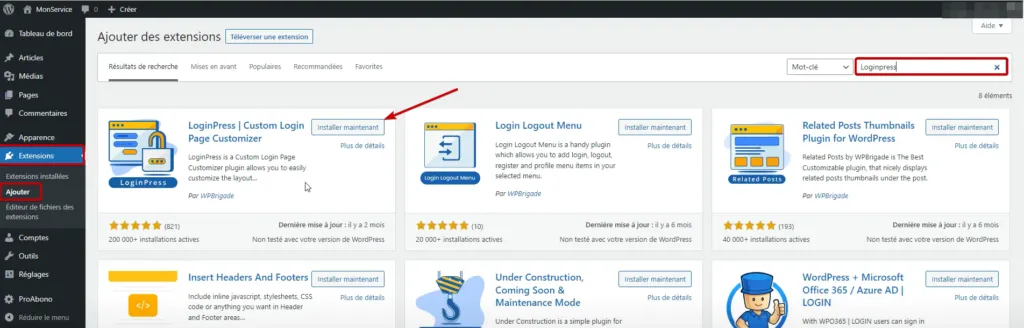
- Click on the “Extensions” section in the left menu of your WordPress site’s back office.
- In the search field, enter “Loginpress”.
- Install and activate the extension.
 **Step 2: Edit and Customize the Registration/Login Page**
Click on “Appearance” > “Loginpress” > “Customizer”.
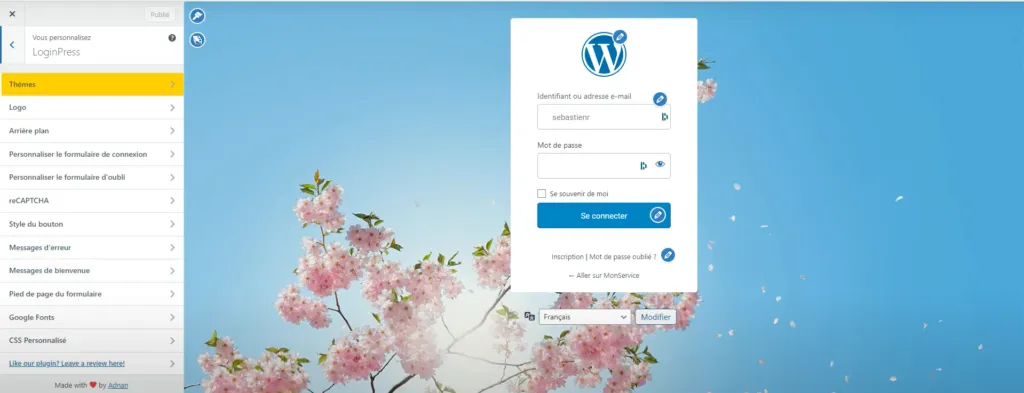
You will be able to modify:
- The logo of the registration/login form.
- Edit all the fields in this form.
- Change the background theme.
- Etc.
Now that these elements are configured, let’s move on to the advanced steps to set up content restriction on your WordPress site using the ProAbono plugin.