

How to use the Proabono API with Postman?
What’s Postman?
Section titled “What’s Postman?”Postman is a graphical interface used by many developers, as it allows to create, store and test requests. It is the ideal tool for testing APIs without having to use code.
Procedure
Section titled “Procedure”1. Download Postman app
Section titled “1. Download Postman app”Go to the Postman download page and choose your operating system. Postman is available for Linux, Windows and OS X.
2. Get ProAbono collection
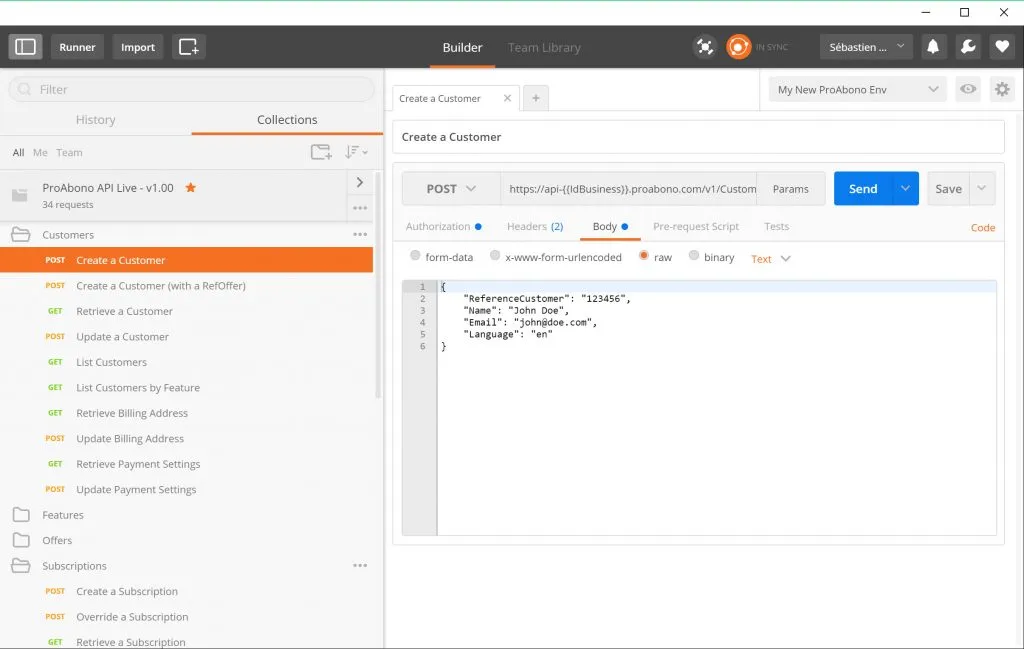
Section titled “2. Get ProAbono collection”Click on the button below to directly import the Proabono collection (set of predefined queries) into Postman.
Once installed, you can see everything you need to test, play the ProAbono API and start your integration.
3. Set up an environment
Section titled “3. Set up an environment”Now that you have imported the ProAbono collection, it remains to configure on which environment you want to test the API.
Follow this steps:
- Retrieve your API data from the BackOffice interface (how do I get my API keys?).
- create a new environment in Postman (see documentation here).
- Add the 3 variables corresponding to your access point and your authentication keys.
- IdBusiness
- KeyAgent
- KeyApi
4. Testez your first request
Section titled “4. Testez your first request”Here is a video that recaps the steps above and shows the creation of a customer and the update of their billing address.