

Automatic payment delay
The automatic payment delay corresponds to the number of days between the issue of an invoice and the automatic triggering of payment. This feature only applies to payments made by credit card or direct debit (SEPA).
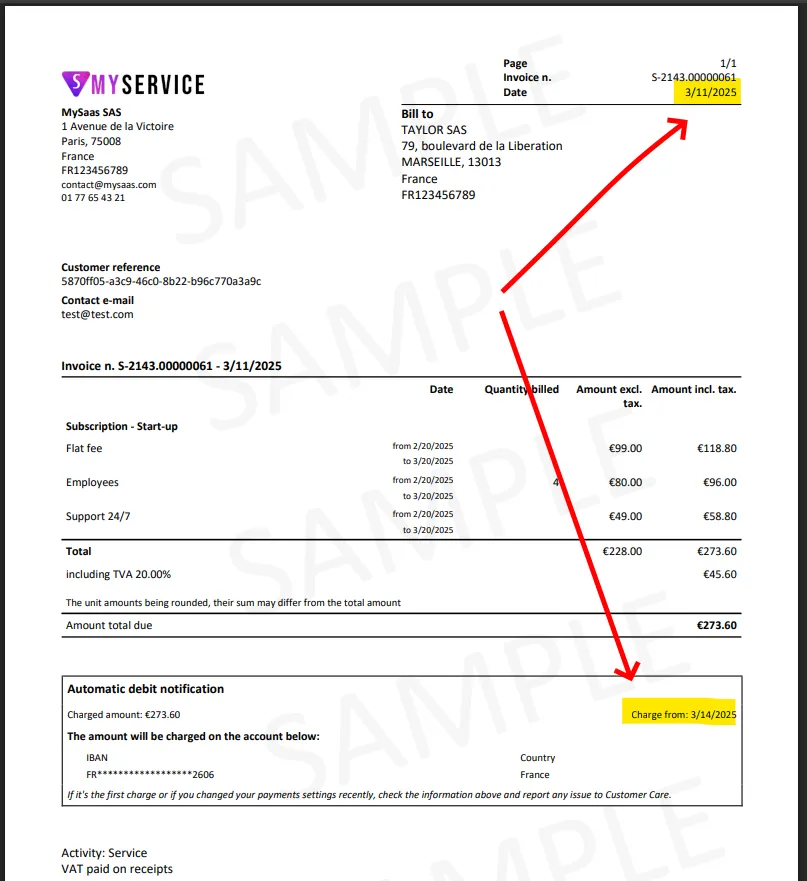
The date on which the invoice will be automatically debited is explicitly indicated on the invoice, in the “Direct debit notice” section.
Sample invoice with direct debit notification
Section titled “Sample invoice with direct debit notification”The invoice below shows the customer a direct debit date +3 days from the invoice issue date:
Setting the Delay
Section titled “Setting the Delay”The automatic payment delay can be configured in Settings > Payment Methods > Payment Method Configuration (General Settings section). You can access it directly by following this link.
The possible values for the automatic payment delay range from 1 to 30 days.
The default value is 3 days.
Even though it is possible to choose a delay of +1 day, we recommend setting at least +3 days. This way, if a customer receives the invoice on a Friday or over the weekend, the payment will be processed at the beginning of the following week. This gives the customer enough time to review the invoice.
Benefits of the Automatic Payment Delay
Section titled “Benefits of the Automatic Payment Delay”- Improved Customer Experience: The delay provides customers with a buffer before the actual debit.
- Reduced Payment Failures: By allowing a short delay, funds may become available in the customer’s account at the time of the debit.
The automatic payment delay is therefore an essential parameter for optimizing subscription and recurring payment management in ProAbono.